ApexFactory ERP
Sales and customers
The selling side of the business sits in the same system as the factory floor. A quotation turns into an order line by line, an order tells production exactly what to make, and the customer's record carries the terms everything is priced on.
What the sales side does
Customers and prospects
Every customer has a short code, a trading currency (GBP, USD or EUR), payment terms, a credit limit, a default discount, addresses and contacts. A prospect is a full customer record you can quote but not yet trade with; Convert to Customer is one-way and records who did it and when.
Quotations with revisions
A quotation moves from draft to sent to accepted, and ends converted, rejected or expired. Revising creates a new revision that keeps its own state, so a customer can go back to an earlier one. Retiring a revision is a reversible archive, not a deletion.
Partial conversion to orders
An accepted quotation converts to orders one line at a time or in groups, onto a new order or an existing draft, and the rest stays open on the quote. It reaches Converted only when every line is converted or cancelled.
Orders that drive production
Order lines carry quantity, unit price, discount, VAT code and due date. When an order is activated the parts it needs are worked out once, so production and purchasing see real demand rather than a spreadsheet of promises.
A sales-item catalogue with a lifecycle
A sales item is a draft, then active, then archived. While active its parts are frozen, so what a customer is quoted is what they get. To change an active item you supersede it with a draft successor, optionally moving pending orders and quotations across.
Prices, discounts and delivery
Give a customer fixed prices for particular items, or a default percentage off every line. Delivery options with their own prices and VAT sit on quotations and orders, and a customer's currency is carried onto every new document.
Export terms on the order
A customer holds default export terms (an Incoterm, a named place and a reason for export) and each order keeps its own copy, made when the order is created, ready for the paperwork that travels with the goods.
Returns and credit
A customer return is a first-class document that authorises specific lines, receives the goods back into stock and settles through a credit note, a replacement order, or both.
From quotation to order, line by line
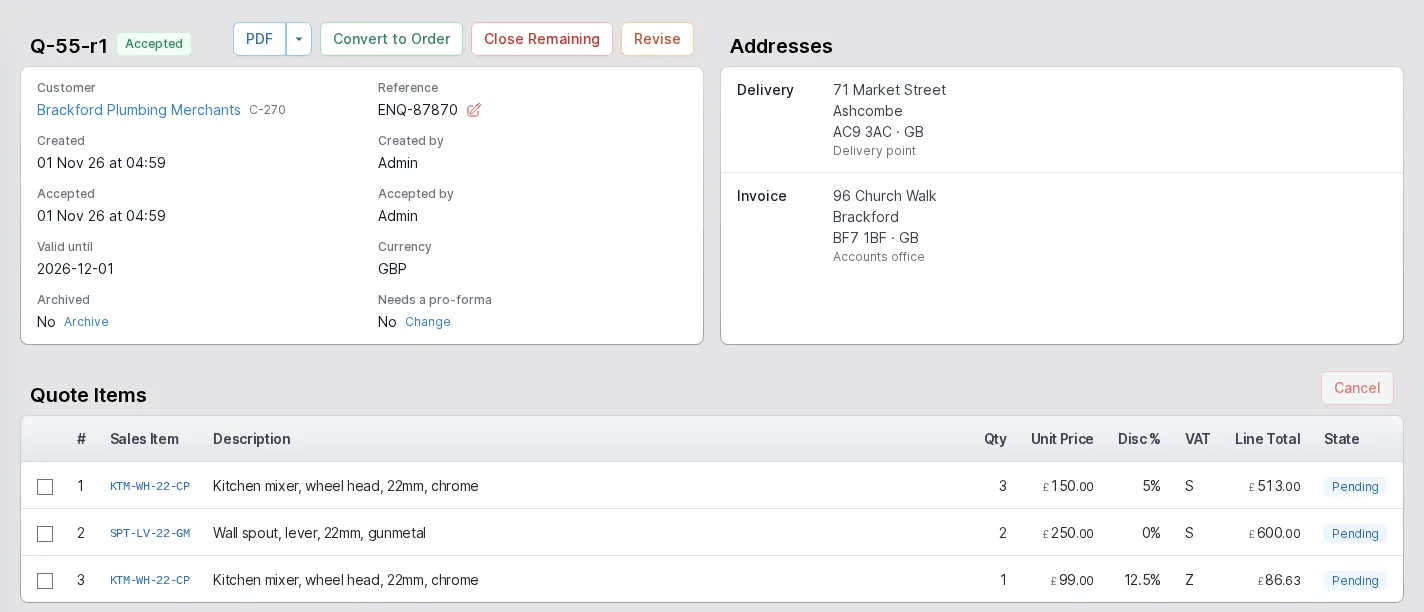
A quotation page shows what the customer will see and what staff need: the customer and their reference, the delivery and invoice addresses, each line with its price, discount and VAT code, and the delivery options on offer. The buttons on an accepted quotation are the whole workflow: Convert to Order, Close Remaining and Revise.
A quotation can also be flagged as needing a pro-forma. The flag is copied from the customer's default, carried onto any order the quote becomes, and drives the activation gate, so an order that must be paid for in advance does not reach the shop floor early.
- Accepted, sent, draft, converted, rejected and expired states, each with its own record
- Revisions that keep their own state, with a reversible archive
- Quotation PDFs from the same templates as every other printed document
See every order through to dispatch
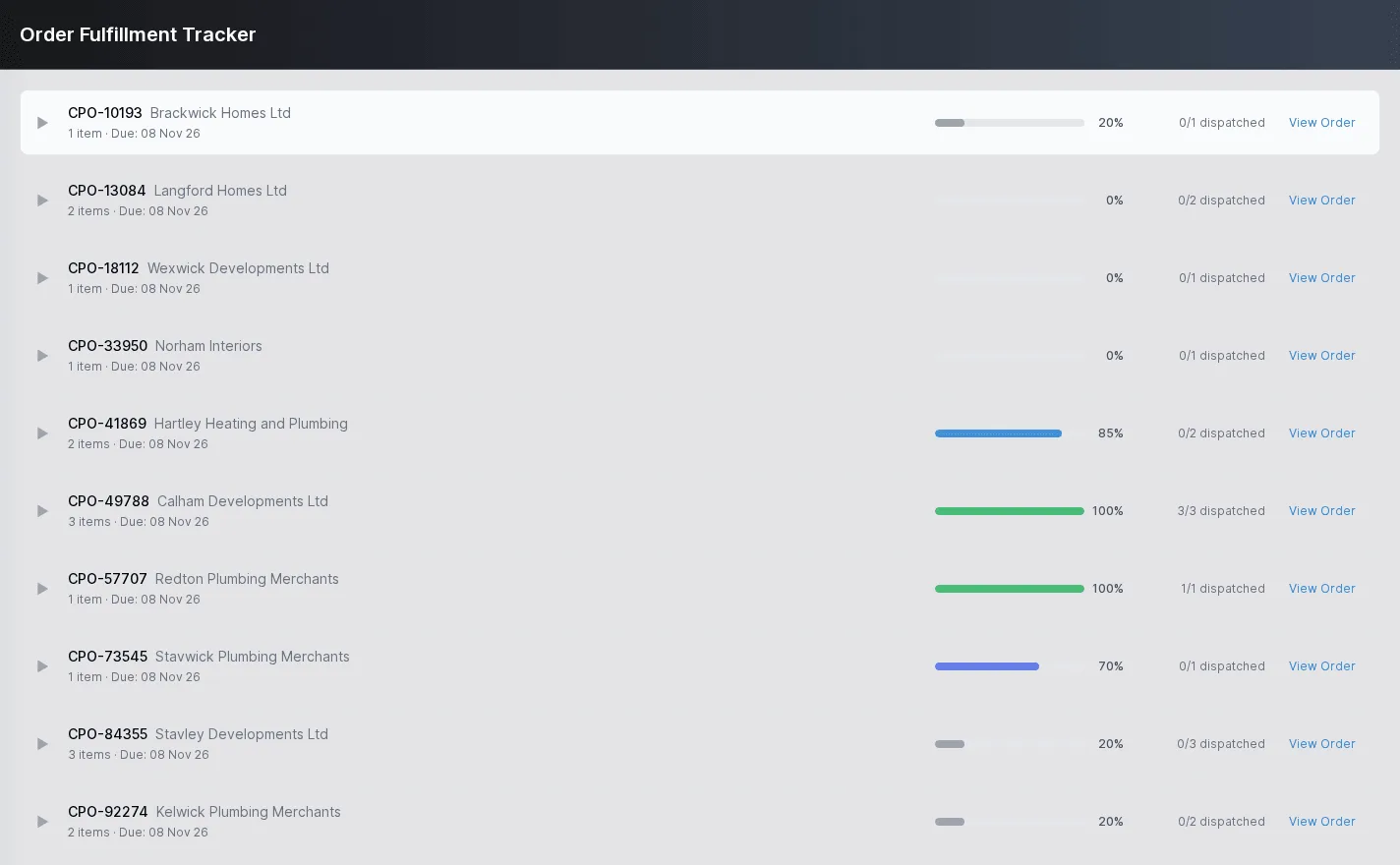
The fulfilment tracker lists each customer order with how much of it has been dispatched, so the person on the phone can answer "where is my order?" without walking to the despatch bay. Each row opens out into its lines, and View Order takes you to the order itself.
The same data feeds the dispatch side: orders that still have items to send, how many of them are ready, and what is due when.
- Progress per order, from none dispatched to all dispatched
- Due dates per order and per line
- One click from the tracker to the order
The rest of the ERP
Every area works from the same record of every part, customer and order.
- 02
Engineering
Parts and how each is supplied, bills of materials, routings and the operations they are built from, with schedules that work back from the due date.
- 03
Production
Jobs and works orders planned from real demand, operations run at workstations, with timing, materials and quality issues tracked as the work is done.
- 04
Purchasing
Suppliers and the parts they sell, purchase orders raised from real demand, goods receipts against orders or straight onto a job, and subcontracting.
- 05
Stock
Warehouses, areas and bins, batches with ownership and purpose, forecasting by part, book in, relocate and stock counts.
- 06
Dispatch
Packages, dispatches and the carriers you use, with export paperwork and proof of delivery kept with each dispatch.
- 07
Finance
Invoices, pro-formas and credit notes, purchase bills, and standard costs rolled up from bills of materials and saved as snapshots.
- 08
Platform
Users and roles, a history of every change, editable document templates, custom fields, global search and to-do lists.
Bring your own quotes and orders
Tell us how your sales desk works today and we will show you the same work in the ApexFactory ERP.