ApexFactory ERP
Purchasing and goods in
Purchasing in the ApexFactory ERP is driven by need. A screen lists every bought part that a customer, a job or a low stock level calls for, groups what is ready to order by supplier, and turns it into purchase order lines. Goods in then close the loop against what was ordered.
What purchasing covers
Suppliers and what they sell
A supplier has a code, payment terms, addresses and contacts, and can be suspended without deleting it. Each supplier lists the parts it sells with a price, lead time, minimum order quantity and pack options, and a part can have a default supplier.
Pending purchasing
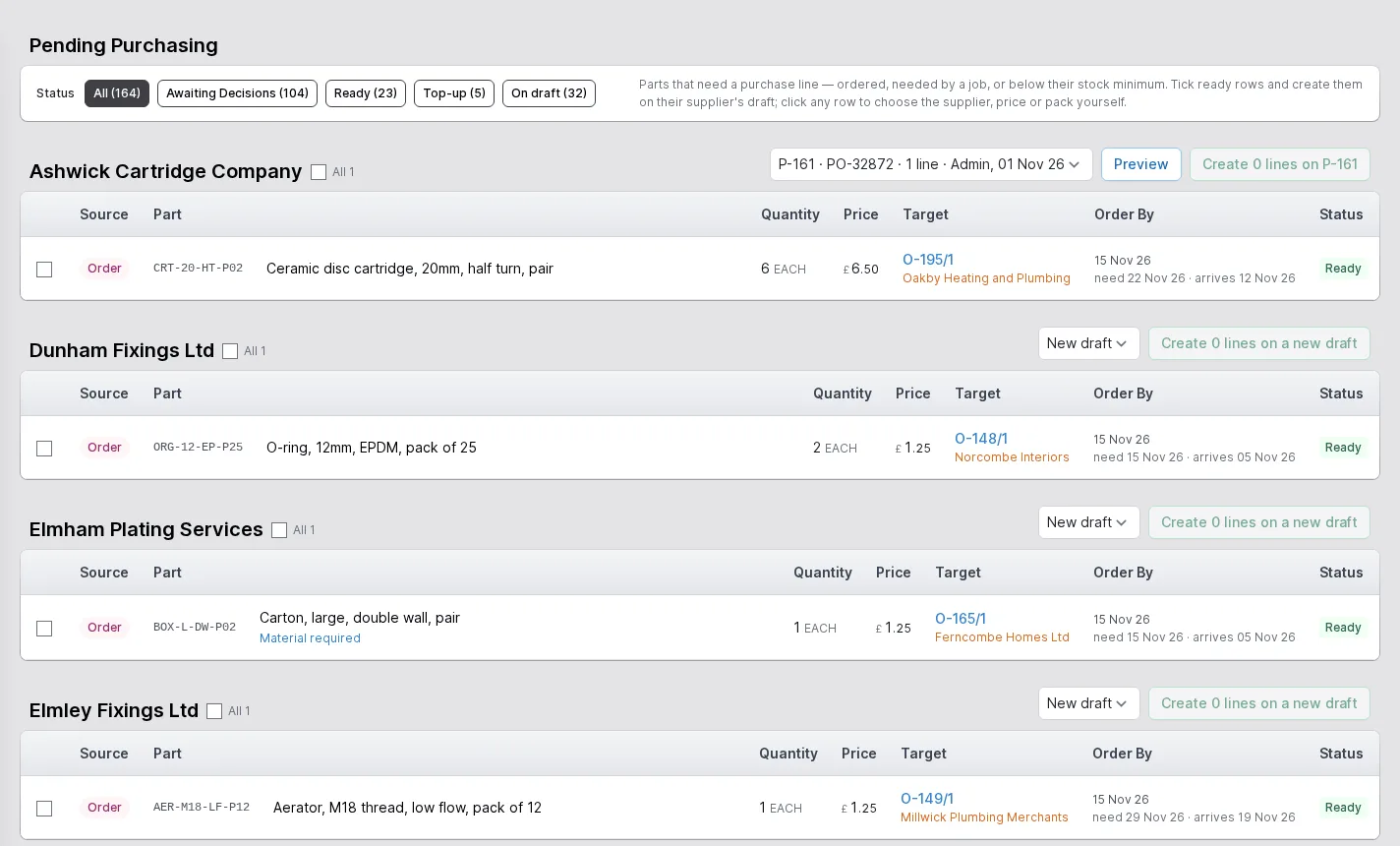
Every part you normally buy that needs a purchase line is listed with where the need came from: an order, a job, a subcontract or stock falling below its minimum. Ready rows are grouped by supplier, and what is missing from the others, such as no supplier, no price or several packs, is shown on the row.
Choose which order a line goes on
Create the lines on a new draft or add them to an existing draft purchase for the supplier. A row leaves the main list as soon as a line exists, and waits in a separate section under its draft until that draft is activated.
Purchase orders with VAT and acknowledgement
Orders move from draft to active to completed or cancelled. Every line carries a VAT code that starts from the supplier's default, delivery charges are part of the order, and the printed order shows net, VAT and total. Record the supplier's acknowledgement and their own order number, and list the orders nobody has confirmed.
Incoming
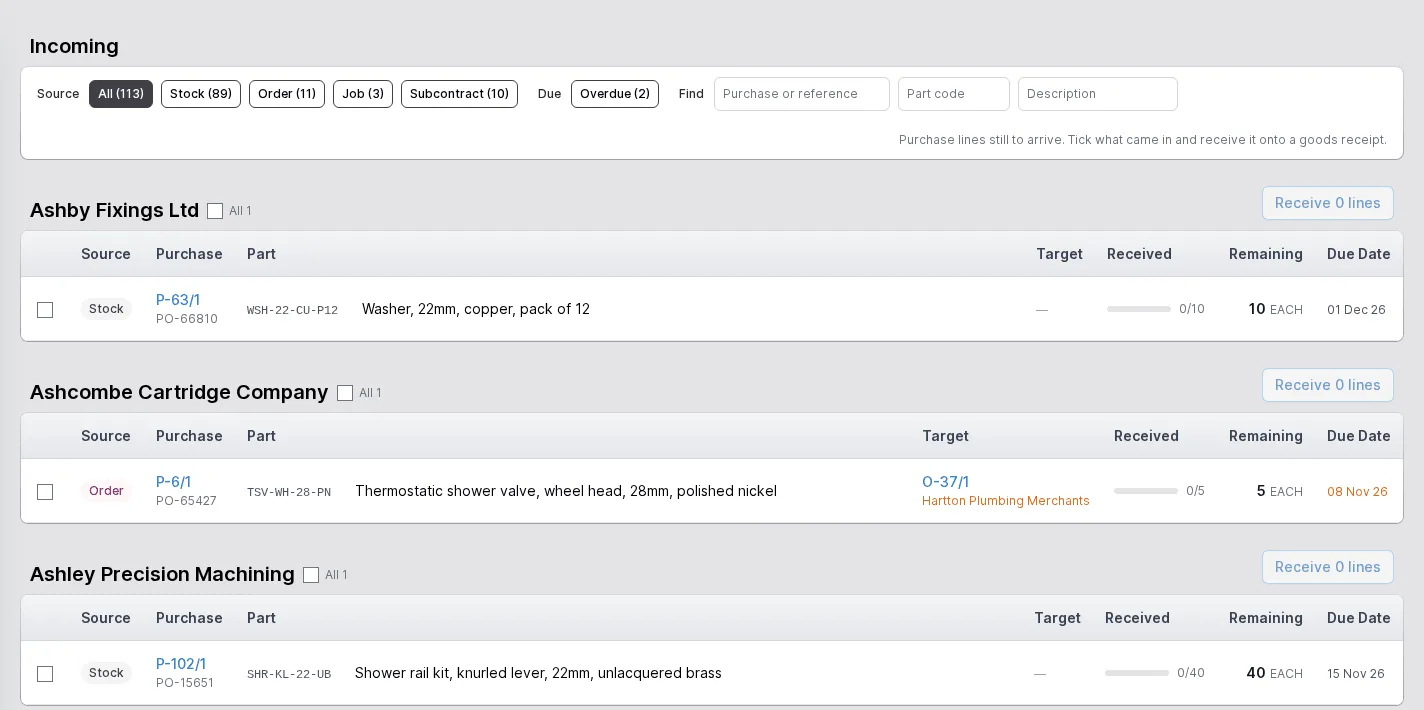
All purchase lines still to arrive, by supplier, with what has been received, what remains and when it is due. Overdue lines are marked, and you can filter by whether the stock, an order or a job is waiting for them.
Goods receipts
Receive items against the orders that placed them, in stock units, and you cannot receive more than was ordered. Bespoke parts can be received in partial quantities, and a receipt can go directly onto a job. A mistake is undone by reversing a single item or a whole receipt.
Subcontracting
Order a part from a supplier who makes it from material you send. The line commits you to send the conversion bill's material, the stores see what to send, and material the supplier destroyed can be recorded as such.
Supplier returns
Send goods back to a supplier as a document of its own, with its own list and its own page.
Buy what is needed, from who you normally buy from
The pending purchasing screen starts from demand. A customer order line for a part you buy to order, a job that needs one, material you owe a subcontractor and stock that will fall below its minimum once what is on the shelf and on order is counted all become rows, each marked with its source.
Rows that are ready appear under their supplier, with the price, the quantity and the date it is needed and when it should arrive. Choose the draft purchase they go on, or start a new one, and create the lines.
- Source shown for every row: order, job, subcontract or stock
- Default supplier chosen automatically; where it had a choice the part code is marked
- Preview and Open links to the draft the lines are on
Know what is coming and what is late
The incoming screen lists every purchase line still to arrive, grouped by supplier, with a progress bar for what has been received, the remaining quantity and the due date. Late lines are shown in red and the supplier's heading counts how many are overdue.
Tick the lines that have turned up and receive them onto a goods receipt in one step. Whether the stock, a customer order or a job is waiting for each line is shown against it.
- Filters by source, due date, purchase, part and description
- Overdue lines counted per supplier
- Receive the lines you tick onto a goods receipt
The rest of the ERP
Every area works from the same record of every part, customer and order.
- 01
Sales
Customers and prospects, quotations, orders, the sales-item catalogue and returns, in one record that follows the customer's order all the way to dispatch.
- 02
Engineering
Parts and how each is supplied, bills of materials, routings and the operations they are built from, with schedules that work back from the due date.
- 03
Production
Jobs and works orders planned from real demand, operations run at workstations, with timing, materials and quality issues tracked as the work is done.
- 05
Stock
Warehouses, areas and bins, batches with ownership and purpose, forecasting by part, book in, relocate and stock counts.
- 06
Dispatch
Packages, dispatches and the carriers you use, with export paperwork and proof of delivery kept with each dispatch.
- 07
Finance
Invoices, pro-formas and credit notes, purchase bills, and standard costs rolled up from bills of materials and saved as snapshots.
- 08
Platform
Users and roles, a history of every change, editable document templates, custom fields, global search and to-do lists.
Buy from real demand
Tell us what you buy and from whom, and we will show you purchasing driven by what the business needs.