ApexFactory ERP
Users, permissions and history
Underneath every area is the same foundation. People sign in as themselves, see what their role lets them see, and everything they change is recorded under their name.
What the platform provides
Users of three kinds
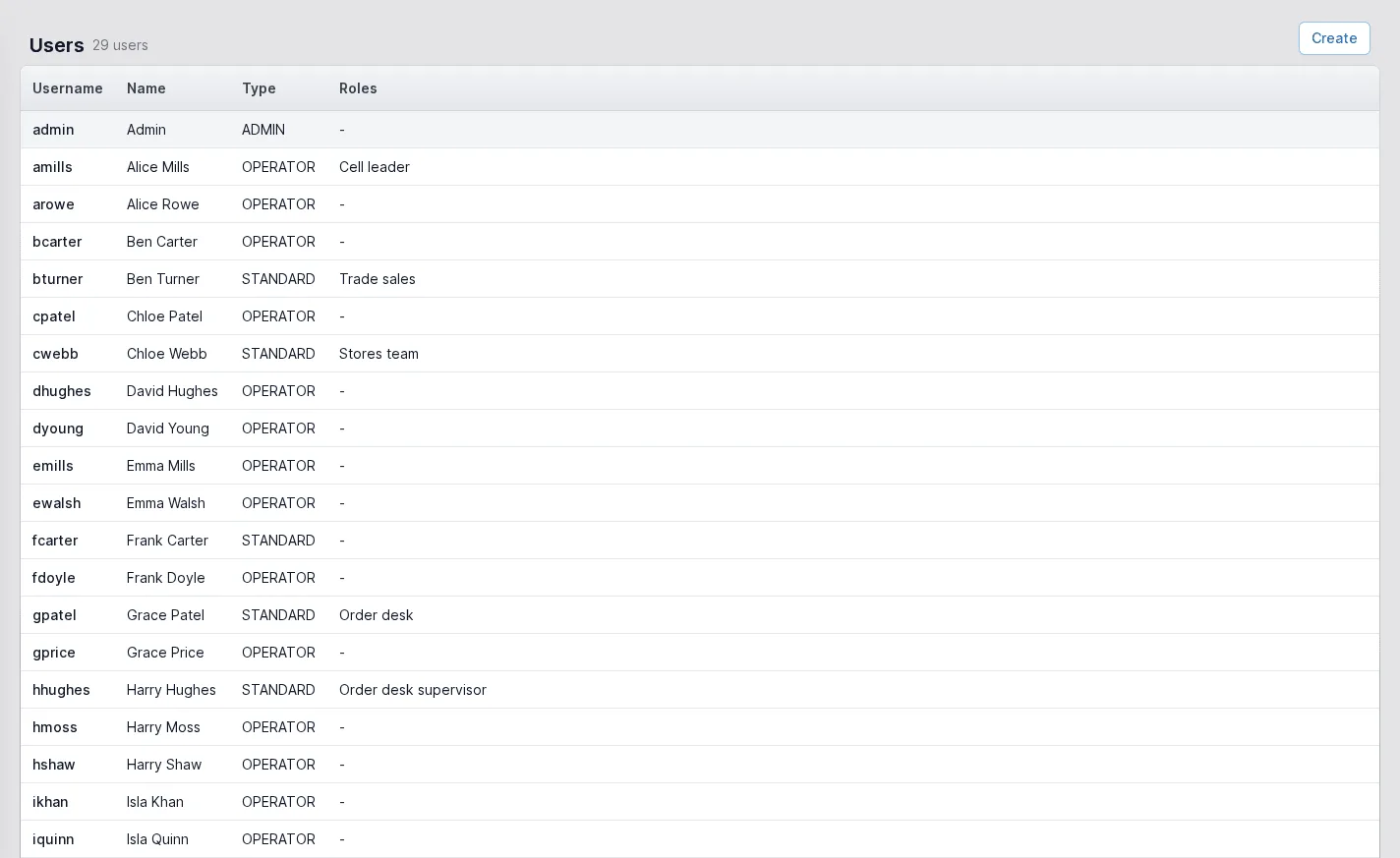
Administrators manage users and settings, standard users do their job according to their roles, and operators, the shop floor workers, get a limited interface focused on production, clock in and out, and receive a default operator role. A disabled user cannot sign in but keeps all their history.
Roles and permissions
A role is a named set of permissions, grouped so that they are easy to read, and users hold the roles they need, such as order desk, stores team or cell leader. Permissions are checked before any change is made.
A history of every change
Every change to an entity is attributable to a user and recorded as an event by the service that made it, so you can see what an order looked like before it was changed and who changed it. Entities are never hard-deleted.
Document templates you can edit
Quotations, order acknowledgements, works orders, dispatch notes, packing lists, goods receipts, purchase orders and pro-forma invoices are rendered to PDF from templates. Each document type can have several, one marked as the default and any other chosen at print time.
Custom attributes
Add your own typed fields to parts, sales items, bill of materials lines, supplier parts and jobs. Values are stored in real columns, can be dropdowns, and are shown on the page, the forms and the selectors you choose.
Global search and to-do
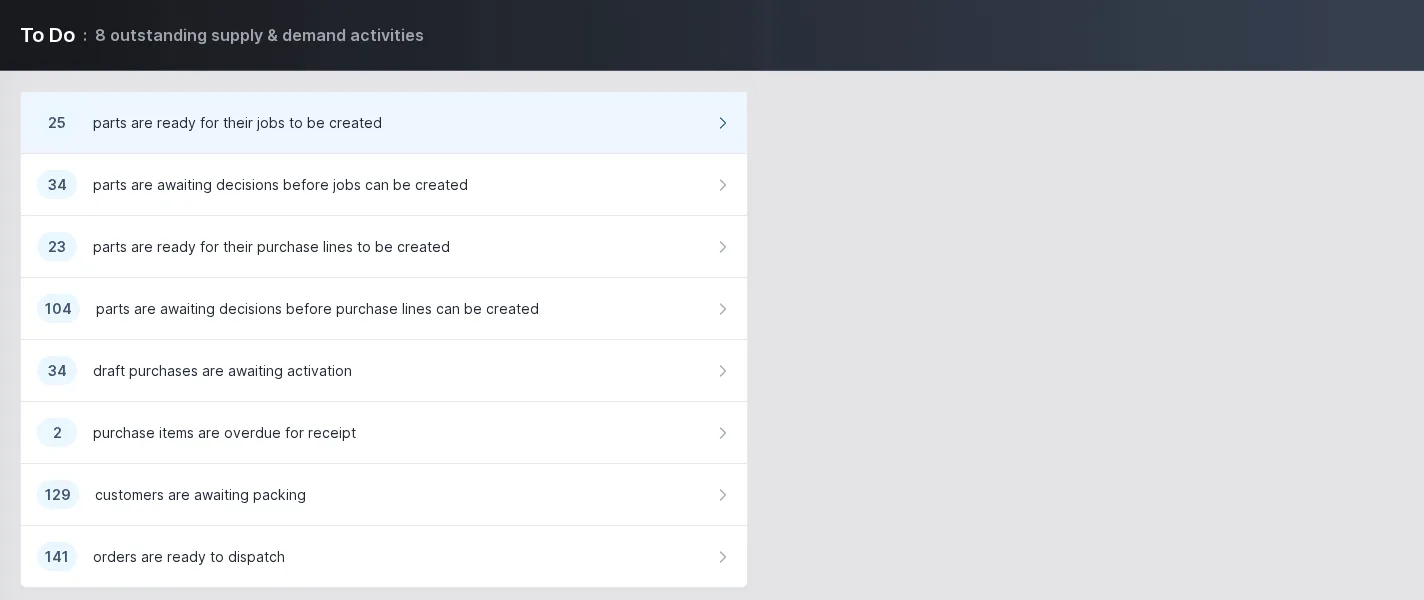
Press Ctrl+K to search across the ERP. The to-do list counts what needs attention, such as parts ready for their jobs, purchase items overdue for receipt and orders ready to dispatch, and each count opens the screen to deal with it.
Comments where the work is
Orders and other documents carry a threaded discussion, so the conversation stays with the record rather than in someone's inbox.
Company details
Your registered name, company and VAT numbers, EORI and registered office are held once and printed in the footer of the standard documents, with the EORI number and statement of origin on customs paperwork.
A to-do list that comes from the data
The to-do page is the day's starting point. Each line is a count from the live data: parts ready for their jobs to be created, draft purchases awaiting activation, purchase items overdue for receipt, customers awaiting packing and orders ready to dispatch. Click a line to go to the screen that deals with it.
The same counts badge the navigation, so someone working elsewhere in the ERP still sees what is waiting.
- Counts drawn from the live data
- One click to the screen that deals with each
- The same counts shown on the navigation
People, roles and who can do what
The users list shows each person, their type and their roles. Administrators create users, assign and remove roles, reset passwords and disable accounts without deleting them. Operators, the shop-floor users, get a simplified interface focused on production tasks.
Roles are defined once and given to as many people as need them, so a change to what the order desk can do is made in one place.
- Administrator, standard and operator users
- Roles such as order desk and stores team
- Disable instead of delete, so history is kept
The rest of the ERP
Every area works from the same record of every part, customer and order.
- 01
Sales
Customers and prospects, quotations, orders, the sales-item catalogue and returns, in one record that follows the customer's order all the way to dispatch.
- 02
Engineering
Parts and how each is supplied, bills of materials, routings and the operations they are built from, with schedules that work back from the due date.
- 03
Production
Jobs and works orders planned from real demand, operations run at workstations, with timing, materials and quality issues tracked as the work is done.
- 04
Purchasing
Suppliers and the parts they sell, purchase orders raised from real demand, goods receipts against orders or straight onto a job, and subcontracting.
- 05
Stock
Warehouses, areas and bins, batches with ownership and purpose, forecasting by part, book in, relocate and stock counts.
- 06
Dispatch
Packages, dispatches and the carriers you use, with export paperwork and proof of delivery kept with each dispatch.
- 07
Finance
Invoices, pro-formas and credit notes, purchase bills, and standard costs rolled up from bills of materials and saved as snapshots.
Control who does what, and see who did it
Tell us how your team is organised and we will show you the roles, permissions and history in the ApexFactory ERP.