ApexFactory ERP
Finance and costing
Finance in the ApexFactory ERP is not a separate world. Invoices come from dispatched orders, credit notes from customer returns, purchase bills from goods receipts and standard costs from the bills of materials engineering maintains.
What finance covers
Invoices on your trigger
Choose when invoices appear: when an order completes, as each dispatch completes, in a scheduled run over dispatches not yet invoiced (still one invoice for each dispatch), or raised by hand. Invoice lines carry the price that was quoted and ordered, so no figure is typed twice.
Pro-formas
A pro-forma asks the customer for payment up front. A customer can be flagged as needing one by default, the flag follows the quotation onto the order, and the list shows what is outstanding and what has been paid.
Credit notes
Credit notes are drafted and issued, linked to the customer return and the invoice they correct, with VAT shown, and can be voided. Return authorisations settle through a credit note, a replacement order or both.
Purchase bills
The supplier bill raised from a goods receipt carries the same VAT on each line as the purchase order, so what you owe matches what you ordered and received.
Exact money, several currencies
Money is held as whole numbers scaled to four decimal places, so a quoted price, an order price and an invoice price are the same figure end to end. A customer trades in GBP, USD or EUR, and one invoice holds one currency.
Payment terms
Terms count their days from the invoice date or from the end of the month the invoice is issued in, and the due date is set when the invoice is issued. A customer with no terms uses your company's defaults.
Cost roll-up and snapshots
Standard costs are calculated by rolling up bills of materials through every level, either for every manufactured part or for chosen parts and what they depend on. Each roll-up is saved as a snapshot with its date, the person and a description, and lists every part it processed.
Numbering you recognise
Documents are numbered with your prefix and a counter, such as PF-1, INV-12 and PB-11, so numbers read naturally on the phone and on paper.
Credit notes that trace to the return
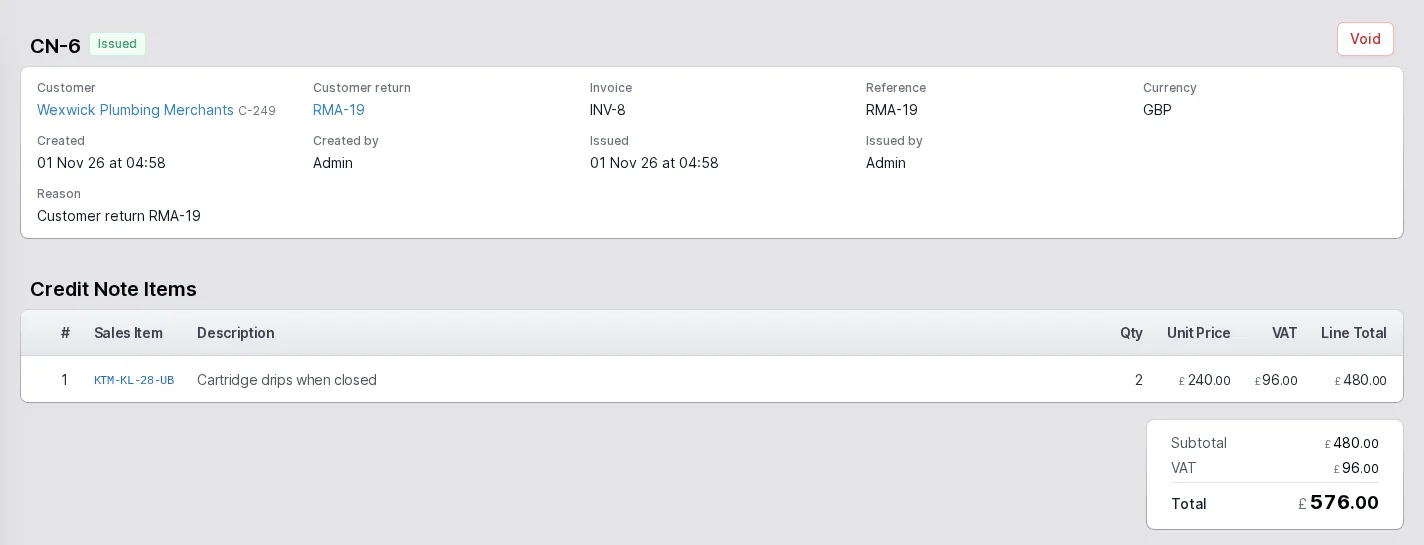
A credit note records who it is for, the customer return and the invoice it relates to, the reason and each line with its price, VAT and total. A credit note starts as a draft and is then issued, and an issued credit note can be voided.
Because it is linked to the return authorisation, the goods that came back into stock and the money that went back to the customer can be read as one story.
- Drafts, issued and void states
- Linked to the customer return and the invoice
- VAT and totals on every credit note
Standard costs with a history
Cost snapshots are dated records of standard costs: what triggered the calculation, who recorded it and every part's cost at that moment. Calculate first and review the changes, including the largest movements and any circular references, then apply to save the snapshot and update the standard costs.
Actual costs, which change more often, can be updated directly without a snapshot.
- Full roll-up or a partial roll-up of chosen parts
- Largest changes and circular references reviewed before applying
- A permanent record of every snapshot

The rest of the ERP
Every area works from the same record of every part, customer and order.
- 01
Sales
Customers and prospects, quotations, orders, the sales-item catalogue and returns, in one record that follows the customer's order all the way to dispatch.
- 02
Engineering
Parts and how each is supplied, bills of materials, routings and the operations they are built from, with schedules that work back from the due date.
- 03
Production
Jobs and works orders planned from real demand, operations run at workstations, with timing, materials and quality issues tracked as the work is done.
- 04
Purchasing
Suppliers and the parts they sell, purchase orders raised from real demand, goods receipts against orders or straight onto a job, and subcontracting.
- 05
Stock
Warehouses, areas and bins, batches with ownership and purpose, forecasting by part, book in, relocate and stock counts.
- 06
Dispatch
Packages, dispatches and the carriers you use, with export paperwork and proof of delivery kept with each dispatch.
- 08
Platform
Users and roles, a history of every change, editable document templates, custom fields, global search and to-do lists.
Close the loop between the shop floor and the ledger
Tell us how you invoice and cost today and we will show you how the ApexFactory ERP does it.