ApexFactory ERP
Packing and dispatch
The last mile of an order is where mistakes become customer complaints. The ApexFactory ERP shows what is ready to go, packs it against the order, records how it left and keeps the paperwork that proves it arrived.
What dispatch covers
Pending dispatch
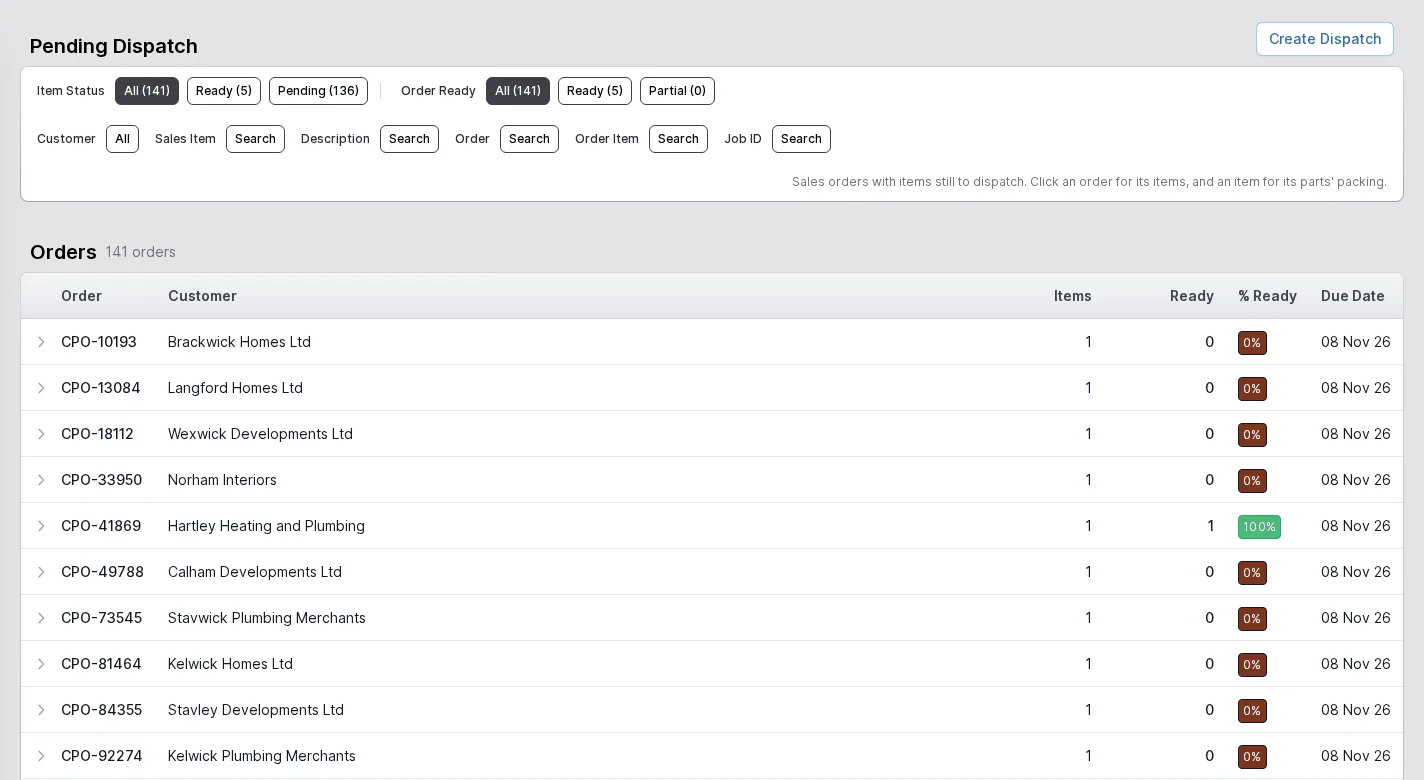
Sales orders with items still to send, how many of those items are ready and the percentage ready per order, filterable by item status, order readiness, customer, sales item, order, order item or job. Create a dispatch from what you select.
Packages
Create a package, add the items to it, link the works orders they came from, pack it and put it in a location such as a bay. A packed package can be unpacked, moved, corrected or cancelled, and each carries a weight.
Dispatches and their states
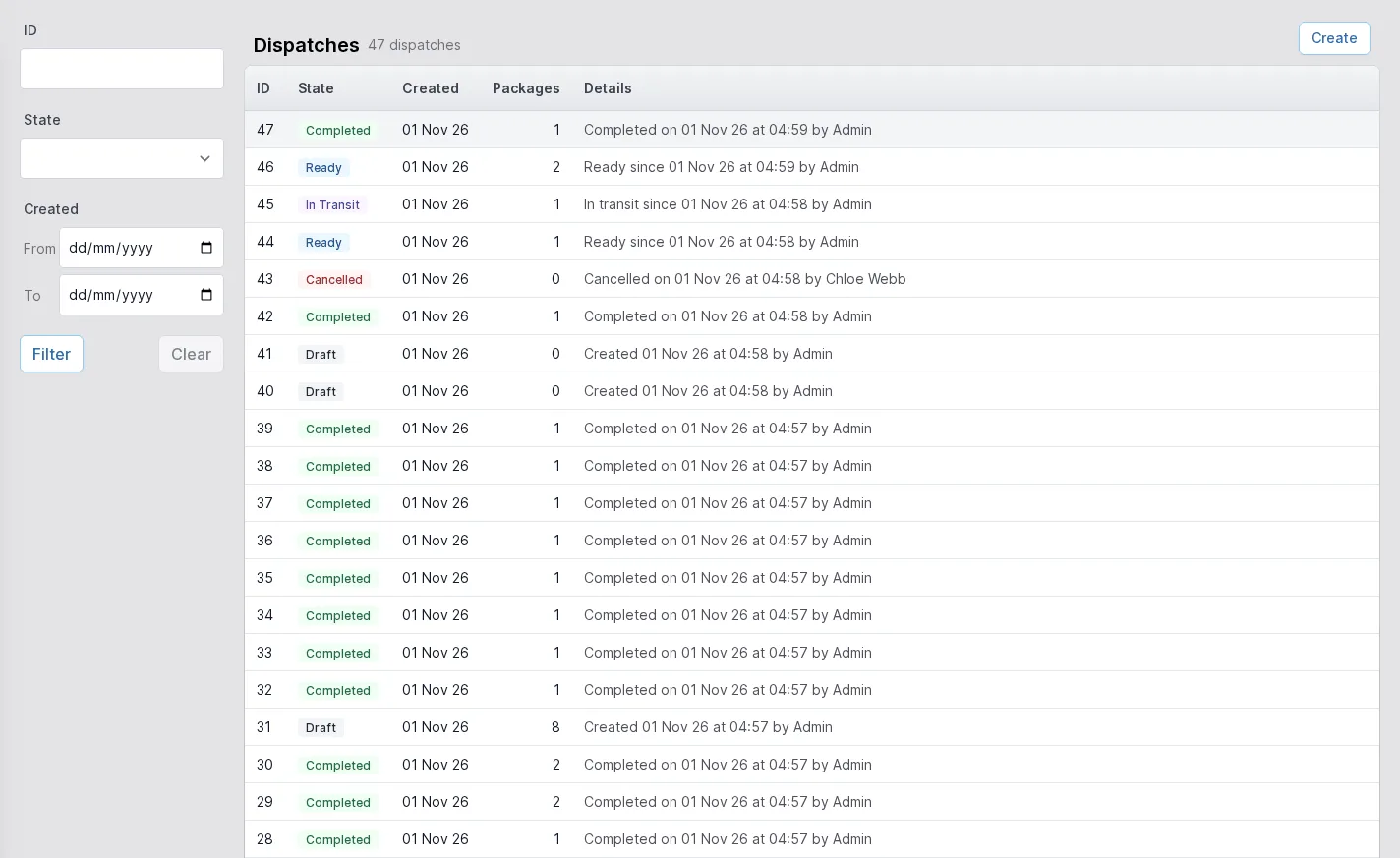
A dispatch moves through draft, ready, in transit and completed, or is cancelled. The list shows each with the packages it carries and who recorded what and when.
Carriers and vehicles
Dispatch locations are your carriers: couriers and your own vehicles. A booked courier is recorded on the dispatch before it leaves, and a carrier can hold the customs statement it needs on export paperwork.
Commercial invoices for export
Goods leaving the country carry a commercial invoice naming the exporter and the buyer, the Incoterm and place, the reason for export and what the goods are: commodity codes, origin, quantities, weights and values. It is a shipping paper, not the tax invoice.
Proof of delivery
Attach any number of files to a dispatch, each with an optional label such as a signed delivery note, a collection receipt or an export certificate. They can arrive at any stage, before delivery or weeks after.
Delivery notes and packing lists
Dispatch notes and packing lists are produced from the same editable templates as every other document, so the paperwork looks the way you want.
Invoices when you want them
Invoices can be raised when an order completes, as each dispatch completes, in a scheduled run over dispatches not yet invoiced (still one invoice for each dispatch), or by hand, as your business prefers.
See what is ready to leave
The pending dispatch screen lists every order with items still to send, with the quantity ready and a percentage so full orders stand out from partial ones. Expand an order to see its items.
Select what is going on this vehicle, create the dispatch, and the system keeps count of what is left.
- Ready, pending and partial filters
- Per-order readiness at a glance
- Dispatch created from the selection
A record of every dispatch
The dispatches list shows each dispatch with its state and the packages it holds. Drafts are being put together, ready dispatches are packed and waiting, in-transit ones have left and completed ones have arrived, with who recorded it and when.
Open a dispatch for its packages, its carrier and its proofs of delivery.
- Draft, ready, in transit, completed and cancelled states
- Filter by state and created date
- Paperwork and proofs kept with the dispatch
The rest of the ERP
Every area works from the same record of every part, customer and order.
- 01
Sales
Customers and prospects, quotations, orders, the sales-item catalogue and returns, in one record that follows the customer's order all the way to dispatch.
- 02
Engineering
Parts and how each is supplied, bills of materials, routings and the operations they are built from, with schedules that work back from the due date.
- 03
Production
Jobs and works orders planned from real demand, operations run at workstations, with timing, materials and quality issues tracked as the work is done.
- 04
Purchasing
Suppliers and the parts they sell, purchase orders raised from real demand, goods receipts against orders or straight onto a job, and subcontracting.
- 05
Stock
Warehouses, areas and bins, batches with ownership and purpose, forecasting by part, book in, relocate and stock counts.
- 07
Finance
Invoices, pro-formas and credit notes, purchase bills, and standard costs rolled up from bills of materials and saved as snapshots.
- 08
Platform
Users and roles, a history of every change, editable document templates, custom fields, global search and to-do lists.
Get orders out of the door, and prove it
Show us how you dispatch today and we will walk you through the ApexFactory ERP's packing and dispatch.